Check a change before you merge
See which lines need attention, read the evidence and send feedback.
On this page
Open a pull-request review
Install ArchDev, then open an accessible PR in ArchDev after connecting the repository. Confirm the repository, comparison base and current head.
Ask your connected agent:
Explain the saved risk assessment for this pull request at its current head. Show what deserves attention and why, and identify any missing evidence.
The agent should use the exact repository, PR number and head revision when reading saved assessments. The connection does not grant access to your checkout or prove the assessment is current. If analysis failed, is missing or covers an earlier head, read the diff yourself rather than treating the absent grade as low.
Read the important parts first
The images below use the real review components with an invented account-access change. They illustrate the controls, not a live PR or a measured assessment result.
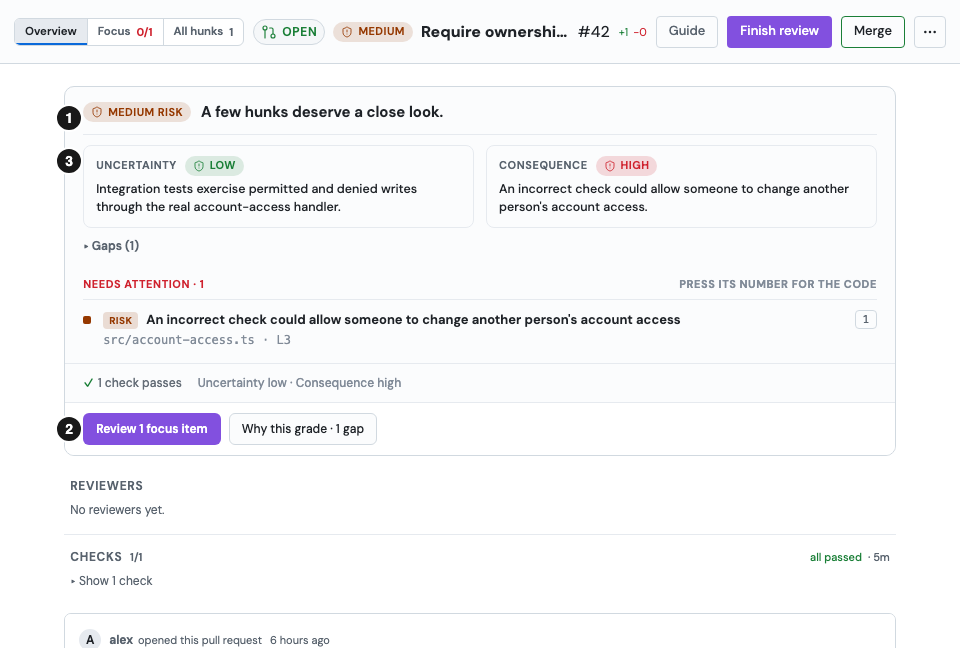
- Overall grade: read the grade for the complete change and its revision. It does not certify tests or approval.
- Focus action: follow Review 1 focus item, Start here, or the equivalent flagged-range list to the first important changed lines.
- Reasons and evidence: open Why this grade and read uncertainty, consequence and gaps.
Under the grade, Needs attention lists only what is wrong: flagged code, scope drift, rule violations, failing checks and linked incidents. Press an item's number to open its code. Rules, checks and scope that pass share one line below the list.
In this example the ownership check follows an established pattern and has relevant integration tests, so uncertainty is low. An incorrect check could let someone change another person's account access, so consequence is high. The risk matrix combines them as medium. Inspect where the guard runs and what the denied-write tests actually exercise.
Give feedback on the code
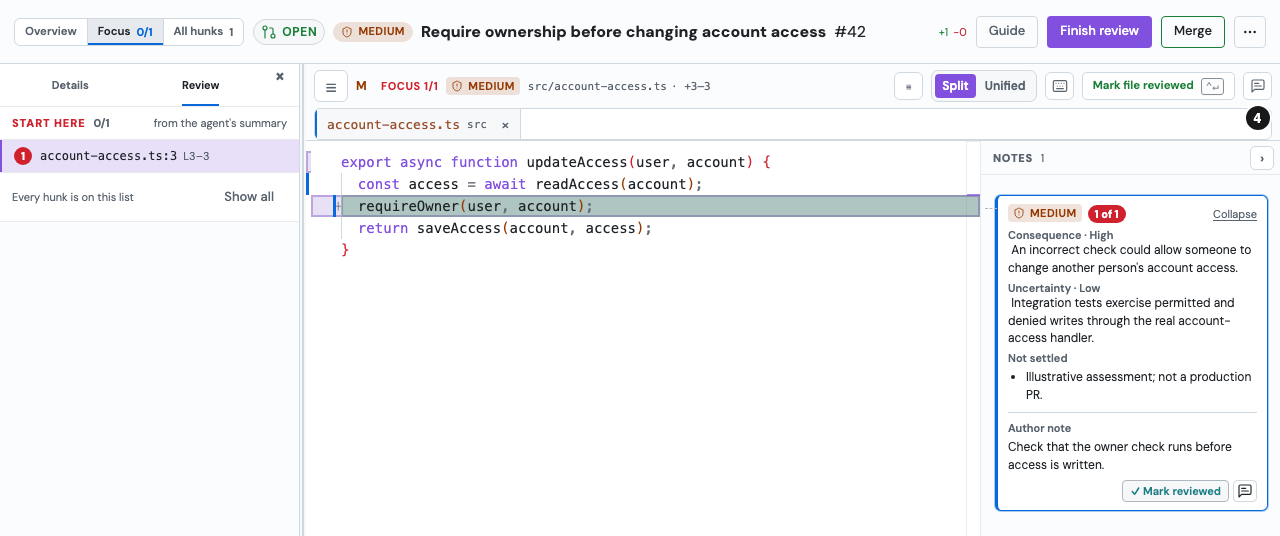
- Comment on the changed range: select a changed line or use the hunk comment control. Describe the behavior to check, such as “Verify that a denied write cannot change account access.”
Follow the review submission controls and your team's approval process. Ask your connected agent to use the feedback and relevant team lessons when working on a revision. Mark reviewed records your reading progress; it is not a merge or proof that the code is safe.
Ask the agent to address the feedback, then inspect the revised diff and affected tests. A new commit or local snapshot is a new revision: revisit the grade and its evidence rather than relying on the earlier result.
For team findings, share a useful lesson only with the right organization access and permission. For the next step on a hosted PR, see Merge and PR follow-up.